
Key takeaways
- →Power BI Pro is $14 per user per month and Premium Per User is $24, both US list prices at the time of writing.
- →Anyone who authors and publishes a Power BI report needs a Pro license, whatever capacity backs the workspace.
- →Free viewing starts at Fabric F64. Smaller F SKUs buy compute and remove no license requirement at all.
- →A reserved F64 costs about the same as 360 Pro licenses, so capacity rarely pays for itself below that viewer count.
- →In a typical mid-market rollout the licenses are a minority of year-one cost; the data model is the real expense.
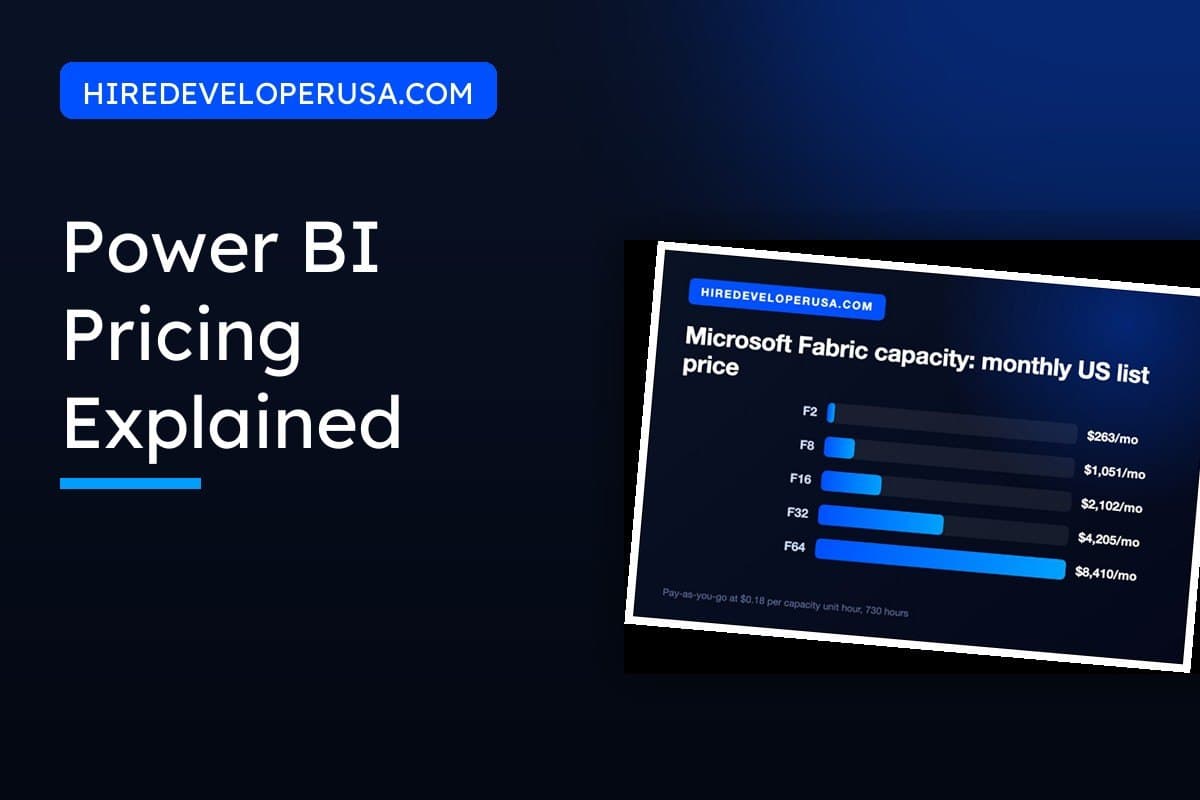
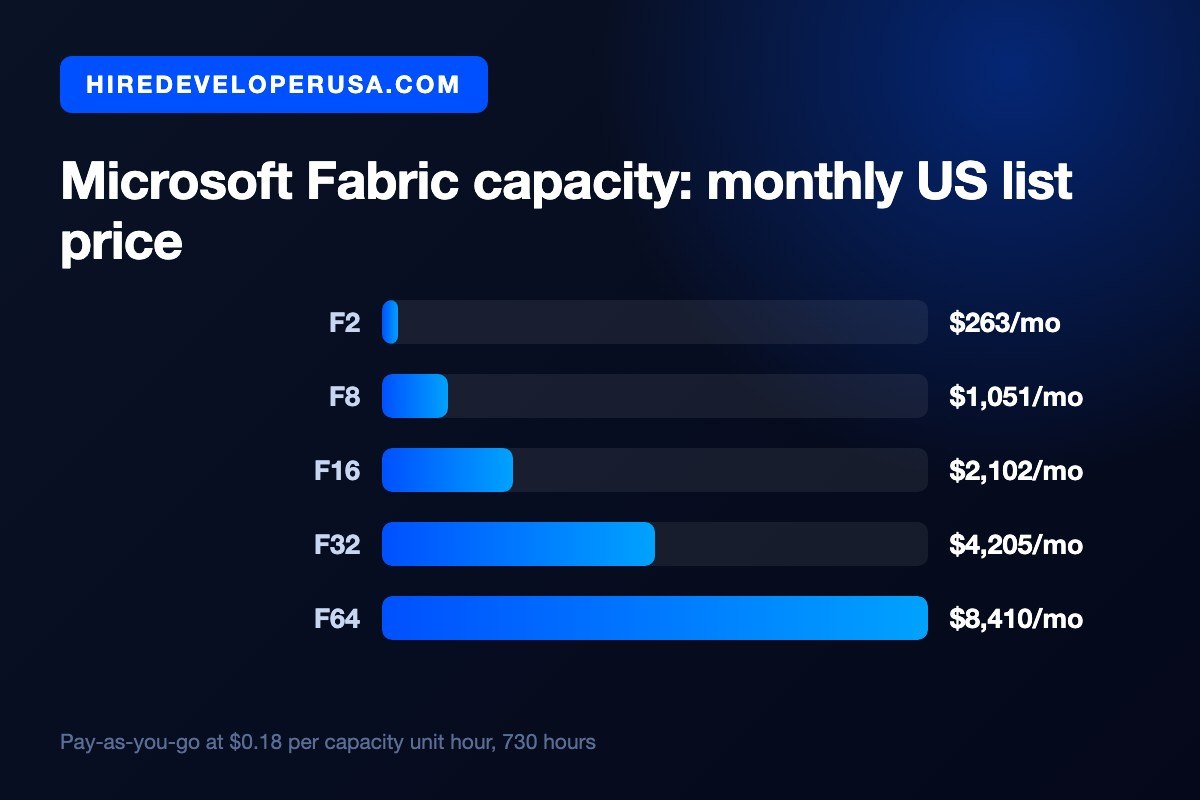
Power BI costs $14 per user per month for a Pro license and $24 per user per month for Premium Per User. Microsoft Fabric capacity, the replacement for the old Power BI Premium capacity, starts at roughly $263 a month for an F2 and runs to about $8,410 a month for an F64 on pay-as-you-go. Those are US list prices at the time of writing, and Microsoft changes them, so confirm the current figures before you sign anything.
For most US teams, that is the whole answer: buy Pro for anyone who touches a report and move on. The figure that trips up finance teams is the one no price list ever shows. In a typical mid-market rollout, licenses come to somewhere around a sixth of what the first year really costs. The rest pays for the person who builds and maintains the data model beneath the dashboards.
Both halves are covered here: what Microsoft charges, and what the whole setup costs once it is up and running.
The four ways to pay for Power BI
Power BI pricing seems complicated because it blends two unrelated billing models. Pro and Premium Per User are sold by the seat. Fabric capacity, by contrast, is sold as compute by the hour, and no seat count is attached. Choosing the wrong model is the costliest mistake in this product.
One rule governs all of it, and it is the single most misunderstood thing about Power BI licensing: anyone who authors and publishes a Power BI report needs a Pro license, no matter what capacity backs the workspace. Capacity does not buy you authoring. What capacity can buy you, and only from F64 upward, is free viewing for everyone else.
| Plan | US list price | Who can view what you publish | Best for |
|---|---|---|---|
| Microsoft Fabric Free | $0 | Nobody. My Workspace only | One analyst working alone |
| Power BI Pro | $14 per user per month | Anyone else holding a Pro license | Most US teams below a few hundred viewers |
| Premium Per User | $24 per user per month | Anyone else holding PPU | Small teams needing large models and frequent refreshes |
| Fabric F2 to F32 | About $263 to $4,205 per month | Viewers still need Pro | Fabric workloads, not cheaper seats |
| Fabric F64 and above | About $8,410 per month, about $5,000 reserved | Free users can view | Hundreds of viewers, or enterprise governance |
Some practical details sit behind that table. The free tier needs a work email address, so personal Gmail or Yahoo accounts cannot sign up. Pro limits semantic models to 1 GB and permits eight scheduled refreshes a day. Premium Per User lifts that to 100 GB models and 48 refreshes a day, and it adds deployment pipelines, paginated reports and XMLA endpoints. With PPU the catch is symmetry: anyone you share PPU content with needs PPU too, so it fits poorly as soon as your audience outnumbers your build team.
Before you buy anything, check what you already own. Microsoft 365 E5 includes Power BI Pro. Plenty of companies discover they have been paying for Pro seats twice.
What changed in 2025, and why your renewal quote jumped
If you are checking a quote against a budget drafted before 2025, both lines on it are wrong.
On April 1, 2025, Microsoft raised Power BI list prices. Pro went from $10 to $14 per user per month, a 40 percent increase, and Premium Per User went from $20 to $24. The new prices applied at renewal rather than immediately, and existing customers were not grandfathered, which is why some organizations felt the change months after it was announced.
The structural change matters more. In March 2024 Microsoft announced that Power BI Premium capacity SKUs, the P1 through P5 line, would be retired in favor of Microsoft Fabric capacity SKUs purchased through Azure. New P SKU purchases and renewals wound down through the start of 2025. If you are still on a P SKU, your path forward is an F SKU, and the mapping you need when you re-quote is that a P1 is equivalent to an F64.
That migration is not purely a renaming exercise. Fabric capacity covers workloads Power BI Premium never did, including lakehouses, warehouses and Dataflows Gen2, and those Fabric workloads do not require Pro licenses because the capacity covers them. The per-seat rule still applies to Power BI report authoring specifically.
The F64 question: when capacity actually beats per-user licenses
The appeal of capacity is obvious. At F64 and above, people who only read reports stop needing a $14 license. The arithmetic for when that pays off is simple, and it is worth running before a vendor runs it for you.
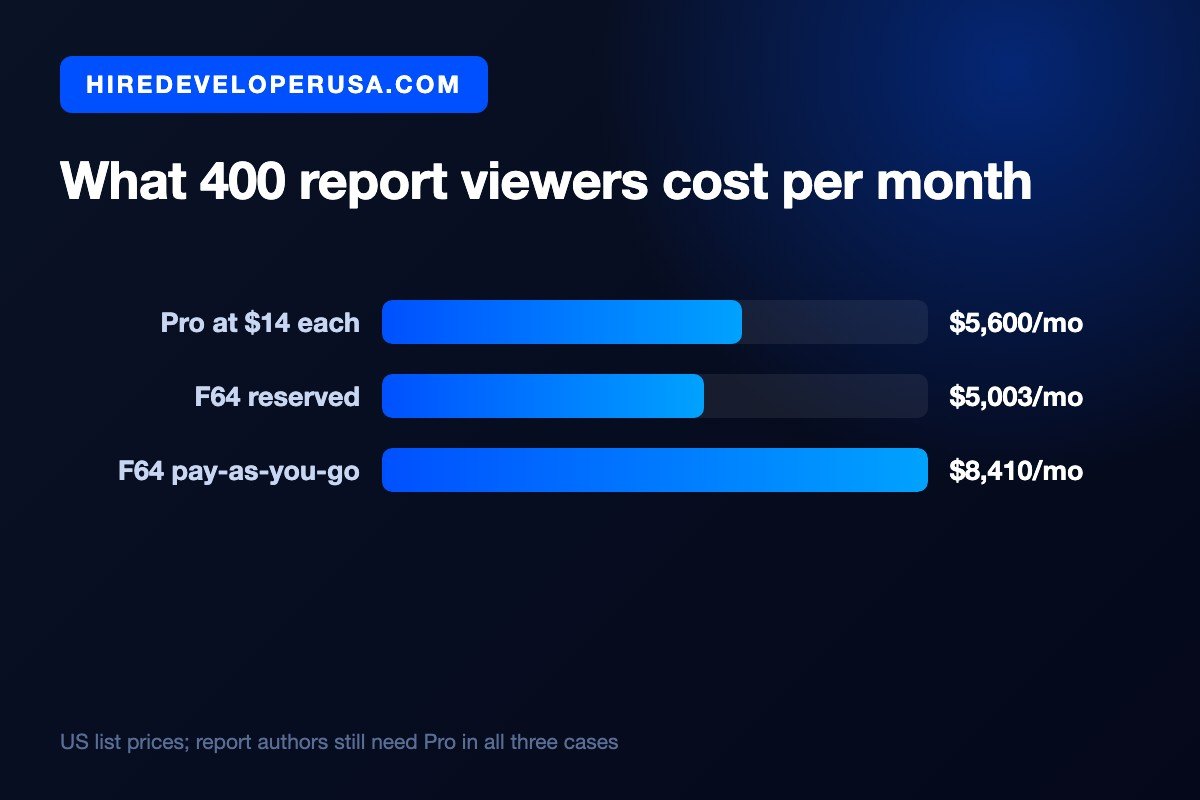
Reserved for one year, an F64 costs roughly $5,003 a month. Divide that by $14 and you get about 360 viewers. At the pay-as-you-go rate of roughly $8,410 a month, break-even sits at about 600 viewers. Under those counts, buying Pro licenses for everybody costs less.
Three qualifications change the answer in practice:
- Count viewers only. Report authors need Pro in every scenario, which puts them on both sides of the comparison, where they cancel out.
- Reservations cannot be paused. Microsoft prices one and three year reservations roughly 41 percent under pay-as-you-go. That is a large discount. Pay-as-you-go, however, bills by the minute and can be paused, so a development capacity running only in business hours can cost less on pay-as-you-go even with the higher headline rate.
- Below F64 there is no free viewing at all. Here is where money gets wasted. An F2 at $263 a month does not cut your license count by a single seat; what it buys is Fabric compute. Should someone propose a small F SKU as a way to avoid buying Pro licenses, that proposal does not work.
Good reasons exist to move to capacity below the break-even: models bigger than Pro allows, refresh frequency, deployment pipelines, multi-geo requirements, or a wish to use the Fabric data engineering workloads. Buy it for the capability, though, and not on the theory that it will cut your license bill.
The costs that never appear on the price list
Licensing is the easy part of Power BI to quote. That is why it dominates the conversation, and why budgets come in low. The spending that decides whether the project succeeds sits somewhere else.
The data model is the project. Building a report on a clean, well-shaped model takes days. Building the same report on raw operational tables takes weeks, because somebody has to define the grain, write the DAX, sort out relationships and reconcile numbers that two departments calculate differently. This is why quotes for the same dashboard vary by a factor of five, and it is the line item to interrogate. Our Power BI developer rate guide puts US marketplace rates at $50 to $120 an hour, with the upper half of that band reflecting modeling and SQL work rather than visual design.
The gateway needs somewhere to live. With on-premises sources, the on-premises data gateway runs on a machine that you pay for and patch. It is a small line item nobody remembers until it breaks on a Sunday.
Storage and Azure consumption are separate. What Fabric capacity buys is compute. OneLake storage, along with other Azure services tied to your pipelines, is billed on separate meters.
The second build. A dashboard's first version seldom survives real questions from real executives. Plan a revision cycle into the budget instead of treating it as a failure.
When you estimate the whole program instead of only the license line, the same logic holds as in any software budget. Our guides on estimating software development costs and reducing software development costs explain how to size the work and where the real savings are.
Three budgets, worked end to end
Figures in context help more than a price list does. The scenarios below are illustrations with their assumptions stated, not measured client results.
One analyst, no sharing. Power BI Desktop is free, and a Fabric Free license covers publishing to My Workspace. Total cost: $0. This works right up until somebody asks to see the report, at which point you need Pro.
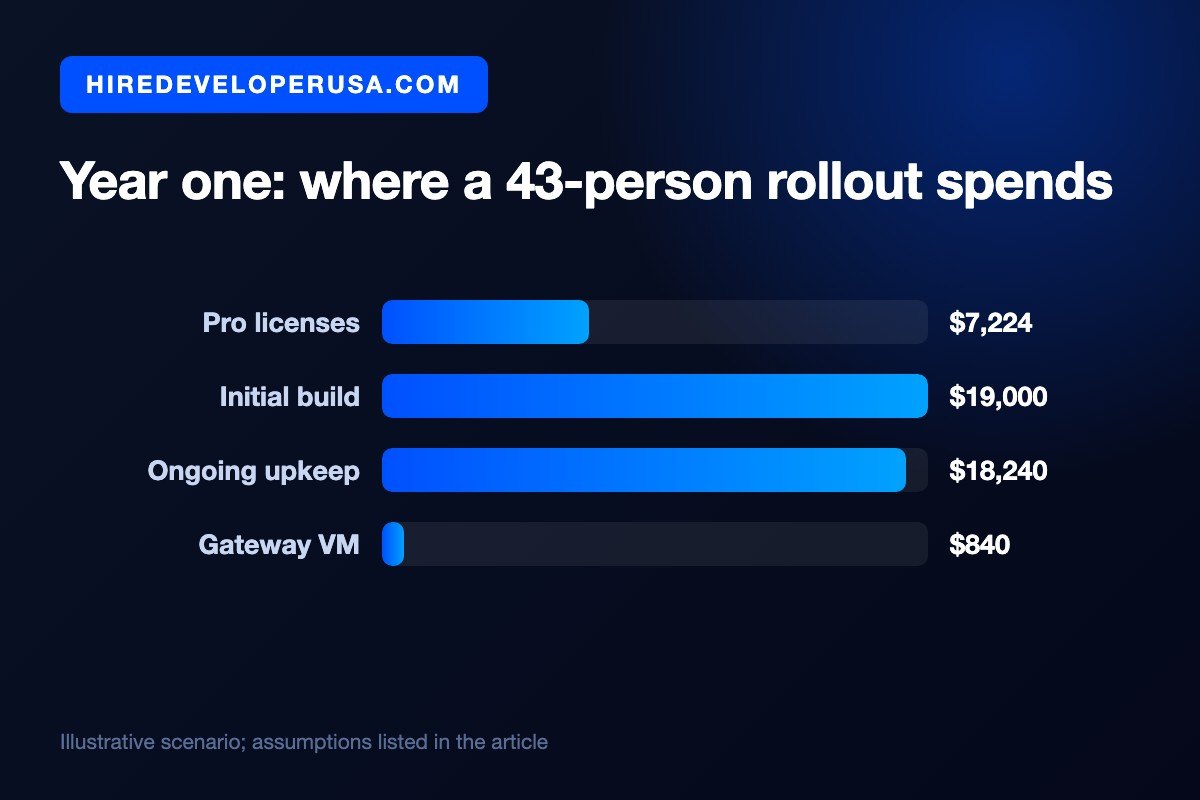
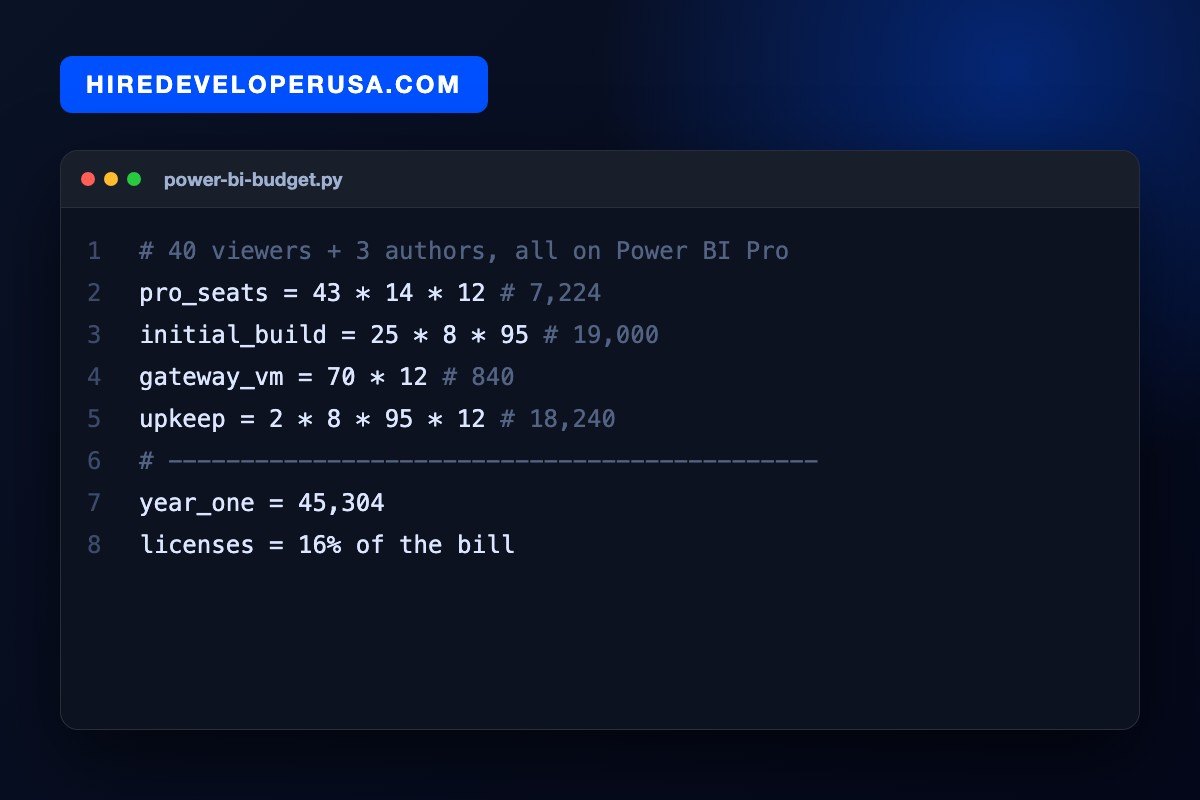
Forty viewers and three authors. Every one of the 43 people needs Pro, since 40 viewers below an F64 are not free. That comes to 43 seats at $14 over twelve months, or $7,224 a year. Now assume 25 days of build work at $95 an hour, plus two days a month of upkeep at the same rate and $70 a month for a gateway VM. Year one ends up near $45,304, with the licenses at about 16 percent of it.
Four hundred viewers and ten authors. Giving everyone Pro means 410 seats at $14, or $5,740 a month. A reserved F64 at about $5,003, plus ten author seats at $14, comes to roughly $5,143 a month. Capacity wins by about $600 a month, close to a wash on a budget that size. The honest conclusion: at this scale you should choose on model size, refresh needs, governance and whether you want Fabric workloads, because the license saving alone does not justify the migration effort.
How to cut the Power BI bill without losing capability
- Audit what you already own. Microsoft 365 E5 includes Pro. Check before you buy a single seat.
- Separate authors from viewers properly. Most organizations purchase far more author-grade licenses than they have authors. In reality the ratio is often one builder for every fifteen or twenty readers.
- Do not buy PPU for readers. PPU exists for people who need premium authoring features. Handing it to an executive who opens a single dashboard each week is a $10 a month mistake, repeated across a department.
- Pause non-production capacity. Pay-as-you-go is billed per minute and can be paused. Only reserve the capacity that truly runs around the clock.
- Fix the model before buying a bigger SKU. Slow reports usually point to a modeling problem. Adding compute to cover a bad model is the priciest way of not fixing it, and that bill comes back every month.
- Right-size and move. F SKUs scale both up and down. Begin smaller than you think you need, then measure.
The common thread is that the cheapest Power BI estate is a well-modeled one. That is a skills question rather than a purchasing question, which is why teams that staff the modeling work properly tend to spend less on everything else.
What to do next
Price your own situation in three steps. Count the people who will actually publish reports and the people who will only read them. Check whether your Microsoft 365 plan already includes Pro. Then multiply: if your viewer count is below roughly 360, per-seat Pro is almost certainly your answer, and Fabric capacity is a question for later.
With licensing settled, what remains to decide is who builds the thing, since that is where most of the year-one spend goes. Should you need that capability, you can hire vetted Power BI developers or bring in broader business intelligence developers able to handle the warehouse layer beneath the dashboards too.
Frequently asked questions
How much does Power BI cost per user?
Power BI Pro is $14 per user per month and Premium Per User is $24 per user per month at US list price. A free tier covers one person working alone who does not share reports. Check your Microsoft 365 plan first, because E5 includes Power BI Pro.
Is Power BI free for small businesses?
It is free for a single person who only publishes to My Workspace, and Power BI Desktop itself is free to use. The moment you share a report with a colleague, both of you need a Pro license at $14 per user per month. There is no free sharing tier below Fabric F64.
Do I still need Power BI Pro if I buy Microsoft Fabric?
Yes, for anyone who creates and publishes Power BI reports. That requirement does not go away at any capacity size. What changes at F64 and above is consumption: people who only view reports no longer need a license of their own.
Why did our Power BI bill go up?
Microsoft raised list prices on April 1, 2025. Pro went from $10 to $14 per user per month and Premium Per User went from $20 to $24. The increase applied at renewal rather than all at once, so organizations saw it at different times.
Hire vetted talent