
Key takeaways
- →A live coding tool is worth paying for only if it runs code in the real language, captures the session and starts in under three minutes. Question libraries are the part to discount, because a library question is a public question.
- →Three categories cover the market: dedicated interview platforms for weekly hiring, real development environments for senior and stack-specific roles, and a plain screen share if you hire two or three times a year.
- →Decide the AI posture before the invitation goes out. Allow and observe, or lock the environment and add a ten-minute extension task. A lock you cannot enforce is an honesty test, not an assessment.
- →In a 60-minute session, the 10 minutes spent changing the requirement produce more signal than the 30 minutes spent on the first implementation.
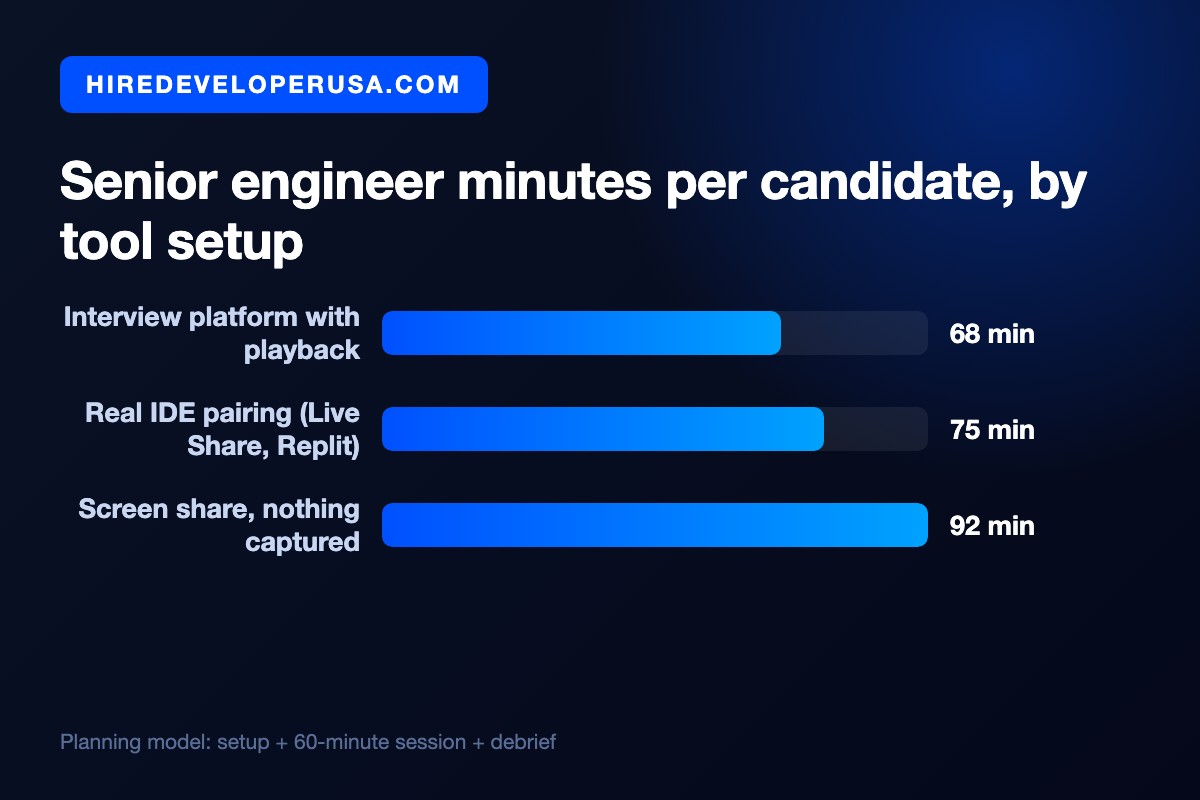
- →Budget about 68 minutes of senior time per candidate on a platform with capture against about 92 minutes on a bare screen share, which is roughly four hours per role across a shortlist of ten.
The best live coding interview tool is whichever one puts runnable code in front of a stranger in under three minutes, lets you decide what role AI plays in the session, and leaves a record you can reread two weeks later, when the hiring debate gets loud. Measured that way, the market shrinks to three choices. One is a dedicated interview platform such as CoderPad, HackerRank CodePair or Codility CodeLive, if you interview most weeks; another is a real development environment such as VS Code Live Share, Replit, GitHub Codespaces or CodeSandbox, if you want the candidate working in something close to your stack; the last is a plain screen share on the candidate's own machine, if you hire twice a year and refuse to pay for a seat. Nearly everything else on a vendor comparison page is one of those three with a different question bank bolted on.
So the useful question is not which product is best, it is which category fits the way you hire. The question and the interviewer produce the opinion; the platform decides whether it survives next Tuesday, when three people who were not in the room ask why you said no. Here is the gate, the category comparison, the AI decision you owe the candidate, and the run of show.
The five-point gate
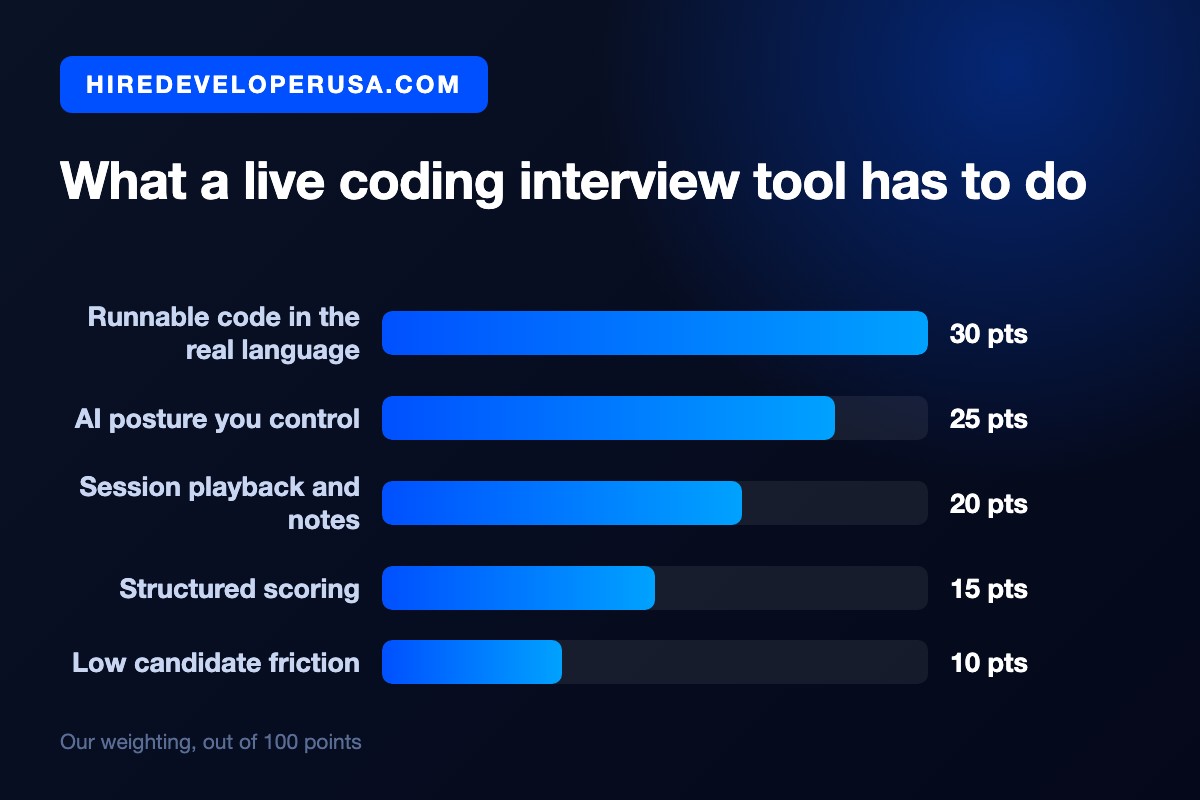
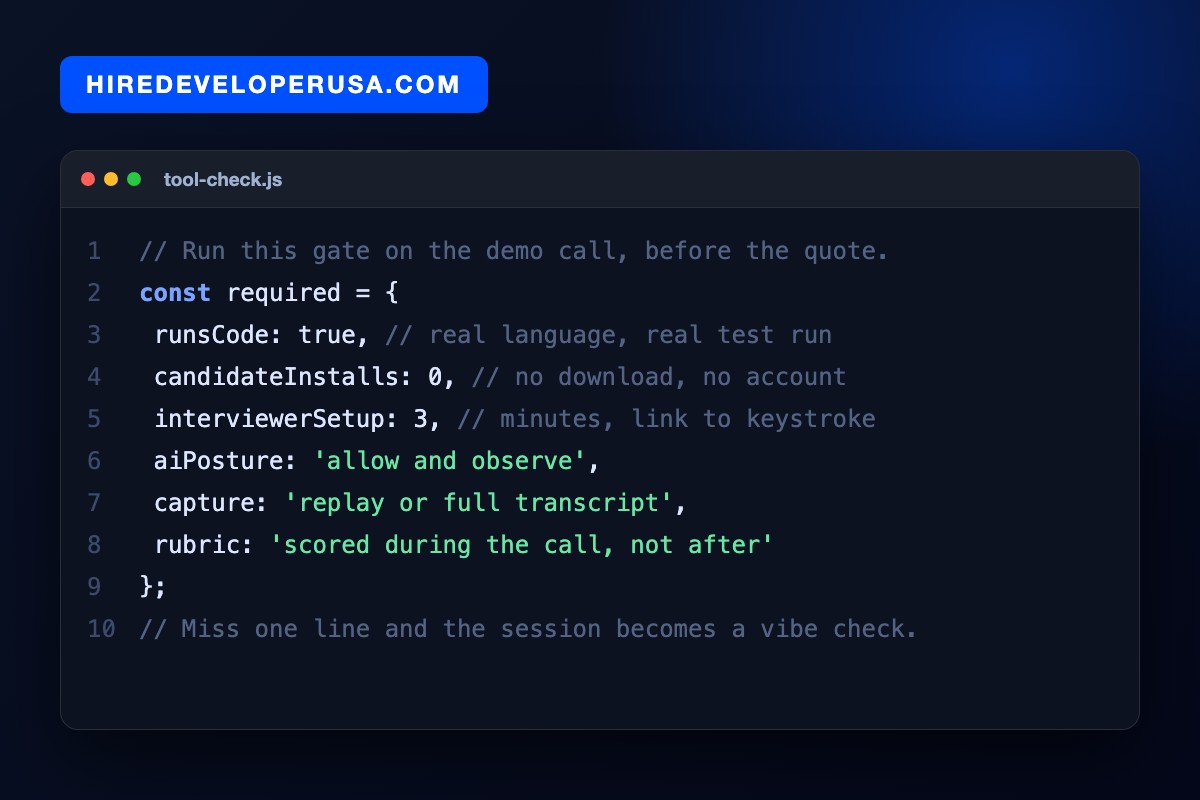
Test every tool against these five, in this order. The first two are pass or fail; the last three separate a hiring decision from a feeling. Notice what is missing: the bundled question library. Discount it first, since a library question is a public question, and in 2026 a public question mostly measures recognition.
1. It runs the code, in the language they will ship in. Not syntax highlighting, not a shared text box: an execute button that compiles, runs the tests and shows a stack trace. The moment they can run their own code you stop grading mental compilation and start watching how they debug, which is the thing you are actually buying.
2. You control the AI posture. Either the environment lets the candidate use an assistant while you watch, or it locks the assistant out and you follow up with a task that assumes it was used. Both are defensible. A tool that leaves this ambiguous, where you are not sure what the candidate has open on their second monitor, is the one option that is not defensible.
3. It captures the session. That means replay, a keystroke timeline, or at the very least the final code plus your notes. A second reviewer can form an independent view only because of capture, and it is the one thing protecting a rejected candidate from a vague recollection.
4. It scores inside the call. A rubric you fill in while the session runs, not a text box you open the next morning. Memory smooths everything toward likability within the hour, and likability is the bias your process exists to contain.
5. Candidate friction is near zero. No download, no account, no two-factor dance; it works on a laptop screen over a mediocre connection. Each minute of setup is a minute of the candidate's best thinking spent on your vendor's onboarding.
Three categories, and when each one wins
Below, the three categories are set against the criteria that decide a purchase. Interviewer setup is counted the honest way: from clicking the link to the candidate's first keystroke, including the two minutes when somebody cannot see the shared cursor.
| Category | Examples | Runs code | Session capture | AI control | Setup | Best fit |
|---|---|---|---|---|---|---|
| Dedicated interview platform | CoderPad, HackerRank CodePair, Codility CodeLive | Yes, mainstream languages | Replay plus shared notes | Explicit modes | About 3 min | Weekly interviewing, several interviewers |
| Assessment suite with a live mode | CodeSignal, HackerRank, Codility | Yes, inside their IDE | Per-candidate report | Tied to proctoring | About 5 min | High volume behind a screening funnel |
| Real development environment | VS Code Live Share, Replit, GitHub Codespaces, CodeSandbox | Yes, your actual stack | Git history only | Whatever the environment allows | 10 min or more | Senior and stack-specific hires |
| Screen share, no tooling | Zoom or Meet plus their own editor | On their machine | Your memory | None you can verify | About 2 min | Two or three hires a year |
Most teams get the third row wrong. A real development environment is the most realistic option, and also the most expensive to run, since the first ten minutes disappear into dependencies, credentials and somebody's Node version. That cost is worth it for a senior backend hire who will spend their week in that exact repository. In a first-round screen it is a waste, because comparability across forty identical sessions matters more there than realism.
The row most teams underrate is the fourth. Watching someone work in their own editor, with their own shortcuts, tells you a surprising amount and costs nothing up front. You pay for it later in write-up time, which the cost section puts a number on.
Decide the AI posture before you book the call
In 2026 this is the question that really separates tools, and most buying processes skip it. It has two coherent answers.
Allow and observe. The candidate uses an assistant, you watch what they ask it, what they accept and what they throw away. You are interviewing the review step rather than the typing step, which is closer to the job than anything we tested five years ago. It needs an environment that does not fight the assistant and an interviewer disciplined enough to ask why after every accepted suggestion. We cover what this changes about the role itself in hiring developers when AI writes the code.
Lock and extend. The platform supplies a clean environment without an assistant, and you accept that you are testing unaided reasoning. Then you add a short extension task that only someone who understands the code can do: change a requirement, break a test, have them explain out loud the tradeoff they just made. That extension gives the lock its meaning. It takes ten minutes.
What does not work is a lock you cannot enforce. If your process depends on a candidate not using a tool they have open on a second machine, you are not running an assessment, you are running an honesty test with a coding theme. Pick the posture you can hold, write it into the invitation, and keep it identical for every candidate on the role.
No tool saves a bad question
Here is the failure mode we see most often. A team buys a good platform, opens the bundled library, picks a question with a public answer, and four weeks later concludes that the tool does not work. The platform was never the problem. A library question has a walkthrough online, so the session that follows measures recall.
Instead, take the problem from your own codebase: a function with an awkward edge case, a bug fixed last quarter, a small feature the team really argued about. Cut it down to about forty lines of context and make it runnable, then make sure you have a second version of the requirement to introduce at minute forty. That one change is where the gap between a confident senior and a confident memorizer shows up.
If you need a starting point for a technology you do not personally write, our interview questions generator gives you a base to adapt, and how to run a technical interview covers the conversation around the code. For the prior question of whether to run a coding exercise at all, and what each format still predicts, see are coding tests necessary.
The 60-minute run of show
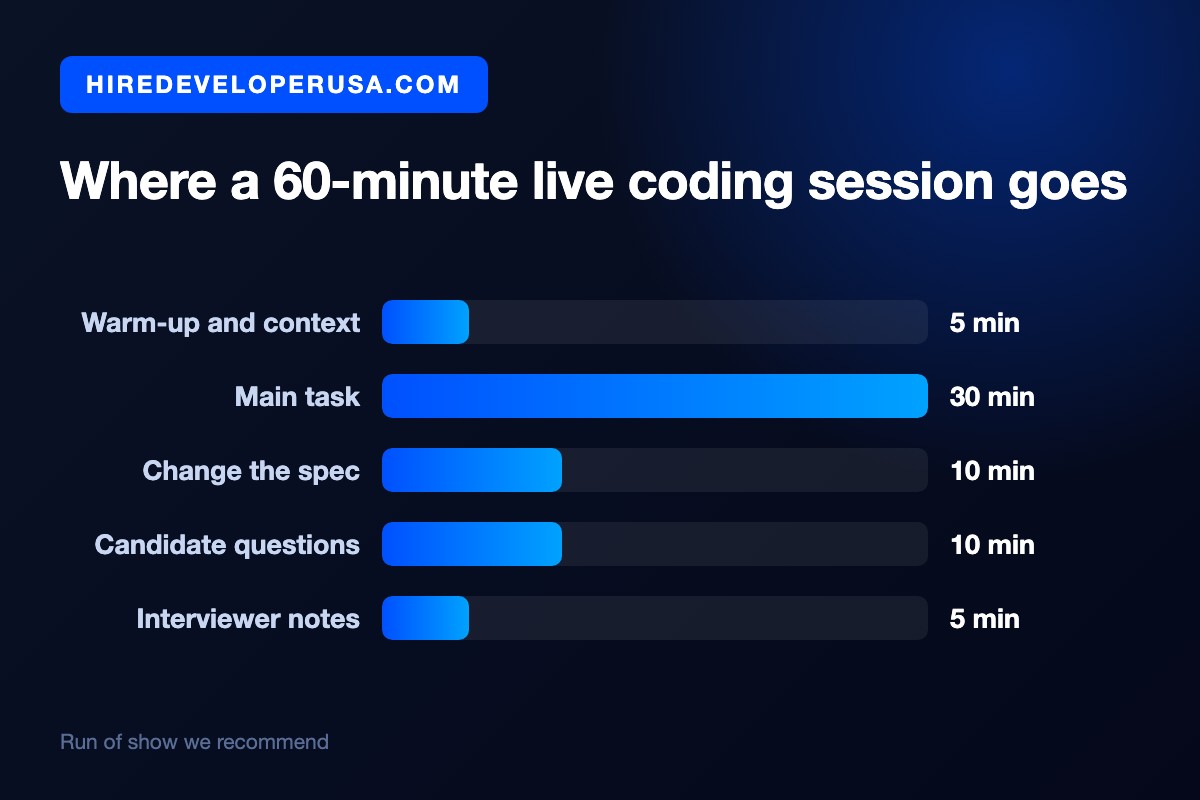
A tool earns its price only when the session has a shape. Here is the one we recommend; it fits inside a single hour on both calendars.
Minutes 0 to 5, warm-up and context. Lay out the problem, the AI rules, and the fact that you expect questions. Tell them out loud that you care how they get there, not whether they finish. Politeness is not the reason: doing this changes what the next fifty minutes show you.
Minutes 5 to 35, the main task. They drive, you stay quiet unless they are stuck in a way that is no longer informative. Resist narrating. The silence is uncomfortable for about ninety seconds, then it produces the most honest part of the hour.
Minutes 35 to 45, change the spec. Introduce the requirement you prepared. Then watch whether they patch it or step back and restructure, and whether they name what the change costs. This is where seniority lives, not in the first implementation.
Minutes 45 to 55, their questions. The questions a candidate asks about your stack, your on-call and your review culture show how they will behave in week three. In this part of the hour, you are also the one being evaluated.
Minutes 55 to 60, your notes. Complete the rubric before opening anything else. Five minutes now stands in for twenty-five later, and the score lands closer to what actually happened.
What the choice costs in senior time
Price the tool against the one budget that is truly scarce: senior engineer attention. Use the planning model below with your own numbers swapped in, covering setup before the call, the sixty-minute session, and the debrief afterwards.
With playback and an in-call rubric, an interview platform costs roughly 68 minutes per candidate, since setup takes three minutes and the debrief five. Pairing inside a real development environment runs about 75 minutes, and the extra time goes to the environment itself. A bare screen share comes to about 92 minutes: the write-up has to be reconstructed from memory, which is slow and unreliable.
Over a shortlist of ten, that adds up to a spread of about four hours of senior time per role. Whether four hours justifies a seat depends on how many roles you run. At two a year the screen share is rational; at one a month the platform has paid for itself by March. That is the entire business case, and it needs no spreadsheet from the vendor.
Pick one this afternoon
Shortlist two tools, no more. Book a demo for each and run the five-point gate live on the call: ask them to open a session, paste in your own forty-line problem, run it, break it, and show you the replay afterwards. If the vendor needs a follow-up call to show you capture or AI controls, that is your answer. Then run three real interviews on the winner before you sign anything longer than a month.
Write the question before picking the platform. Settle the AI posture before the invitation goes out, and score during the call. With those three in place, almost any tool in the first category works; skip them, and even the best platform on the market still returns a feeling with syntax highlighting.
If the shortlist is the bottleneck rather than the interview, we can put pre-vetted full-stack developers in front of you in 48 hours, so your hour goes to the two candidates who are worth an hour.
Frequently asked questions
What is the best live coding interview tool?
There is no single winner, there is a category that fits your hiring volume. If you interview most weeks, a dedicated interview platform such as CoderPad, HackerRank CodePair or Codility CodeLive wins on setup speed and session capture. For a senior hire on a specific stack, pairing inside a real environment such as VS Code Live Share, GitHub Codespaces or Replit is more realistic and worth the extra setup. If you hire two or three times a year, a screen share on the candidate's own machine is genuinely enough, provided you write your notes before the call ends.
Should candidates be allowed to use AI in a live coding interview?
Yes for most roles, provided you watch how they use it. Since the job now includes reviewing generated code, interviewing that review step is closer to reality than banning the assistant. There is an equally valid alternative: lock the environment, then add a ten-minute extension task that only someone who understands the code can complete. An unenforceable ban is what fails, because you have no idea what is open on the candidate's second screen. Choose one posture, write it into the invitation, and keep it identical for every candidate on the role.
Is VS Code Live Share enough, or do I need a paid platform?
Live Share is enough when the interviewer prepares the repository in advance and the session is written up immediately. It gives you the most realistic environment at no licence cost. What it does not give you is replay, a shared rubric or a comparable record across interviewers, so it degrades as soon as several people interview for the same role. The rule of thumb: under roughly one technical hire a month, Live Share plus discipline beats a seat you barely use.
How long should a live coding interview be?
Sixty minutes, with a thirty-minute main task. Shorter and you only see the first implementation, which is the least informative part. Longer and fatigue starts measuring stamina instead of skill. Protect ten minutes for a change to the requirement and ten for the candidate's questions, and write your notes in the final five minutes rather than the following morning.
Hire vetted talent